
Shopify app analytics
See your true Shopify app performance in one clear dashboard
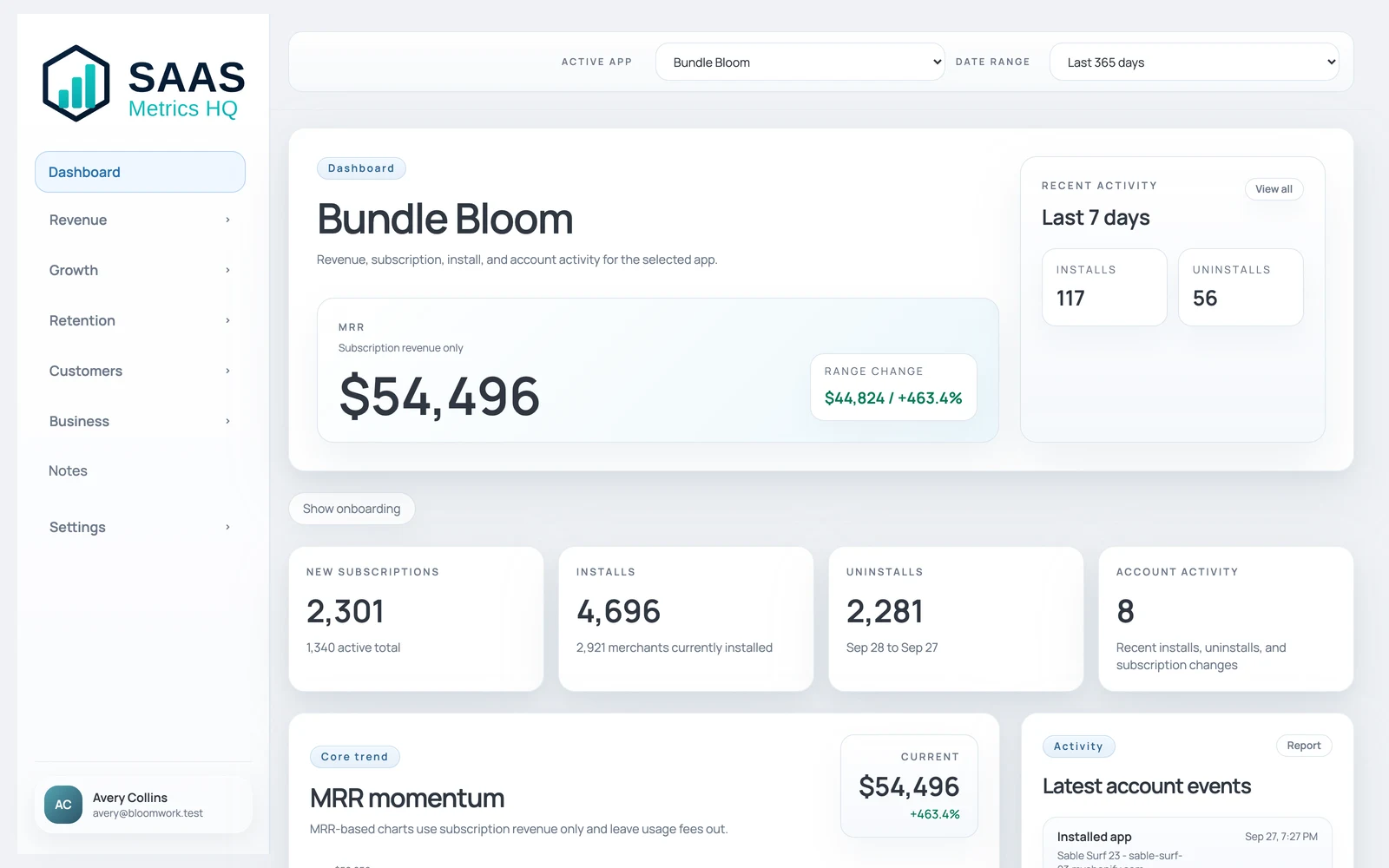
Track revenue, retention, growth and customer movement from your Shopify app business, without rebuilding the same spreadsheet every week.
Built for Shopify app founders and operators.
What you get
Revenue you can explain
Recurring revenue with definitions you can point at.
- MRR
- ARR
- Revenue
- LTV
- ARPU
Growth you can qualify
Judge install spikes by the paid customers that follow.
- Conversion
- Installs
- Uninstalls
- Total users
Retention you can act on
User churn and subscription churn reported separately, not one blended number.
- Retention
- User churn
- Subscription churn
Customers in context
Investigate a store without leaving the reports.
- Customer detail
- Shopify plans
- Activity
The operating problem
Your numbers exist. They just do not live in one place.
Shopify Partner exports answer narrow questions. Turning them into a weekly operating view usually means another spreadsheet, another definition and another hour lost.
- Exports get stitched together by hand, in a slightly different way each time.
- Metric definitions drift between spreadsheets, so numbers stop agreeing.
- Movements arrive without context, so nobody remembers which release or price change happened at the same time.
How it works
From Partner data to an operating view
- Step 1
Connect your Partner organisation
Connect the Shopify Partner organisation and choose which apps to analyse.
- Step 2
Let the historical import finish
Your history imports in the background. How long it takes depends on your account history and Shopify's API limits. You can add plan names and trial settings from supported Shopify exports.
- Step 3
Read the reports with confidence
Use clear report definitions, data-readiness states and date ranges to interpret performance.
- Step 4
Annotate what changed
In the Notes section, add notes for launches, incidents, pricing changes and campaigns. They show beside your metric trends.
Revenue
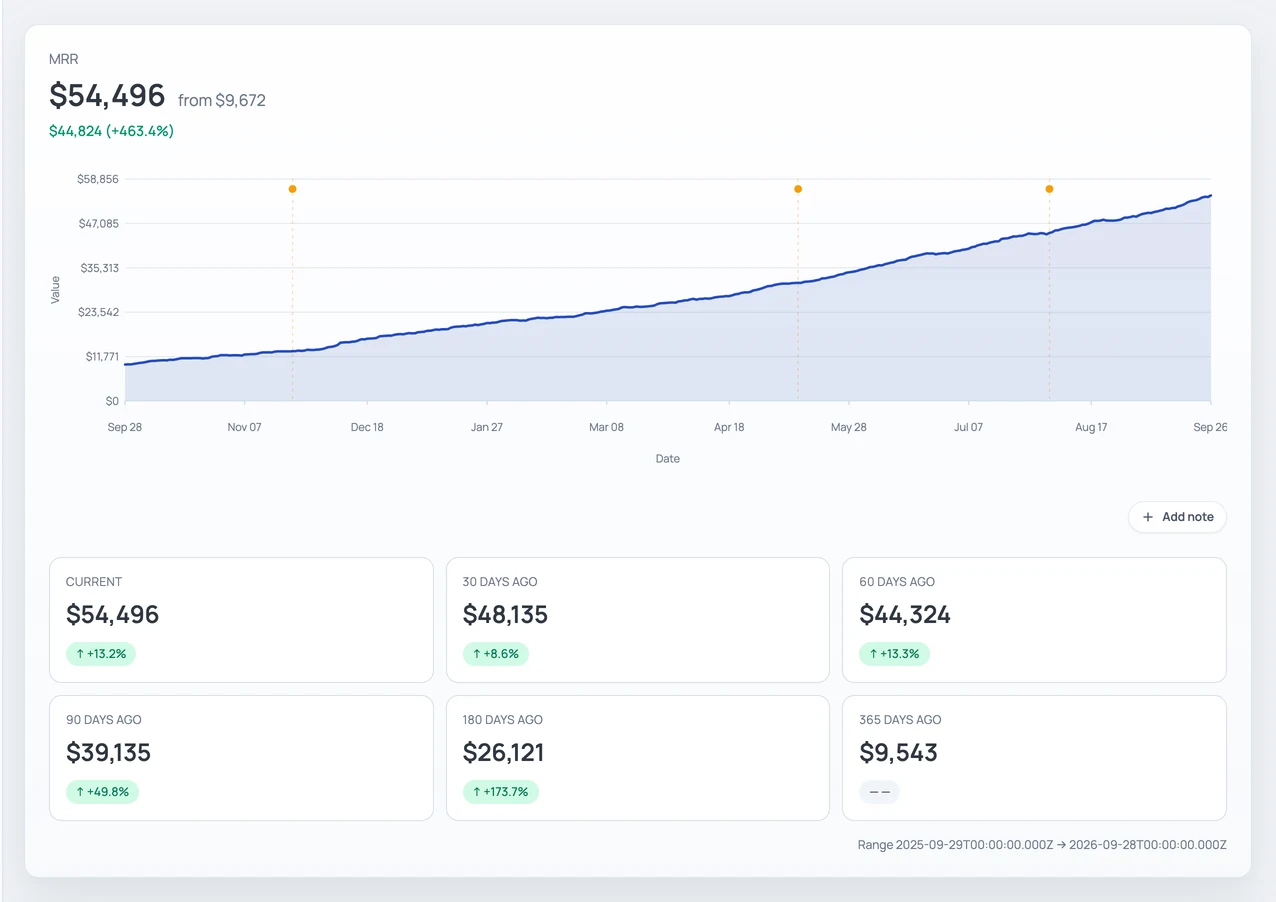
Know what recurring revenue is really doing
- MRR, MRR growth rate, revenue and ARR over any range
- LTV, ARPU, active subscriptions and usage charges
Retention
See where the installed base is leaking
- Cohort retention, total users, installs and uninstalls
- User churn and subscription churn reported separately
Reports describe what happened. They do not predict churn.
View retention reports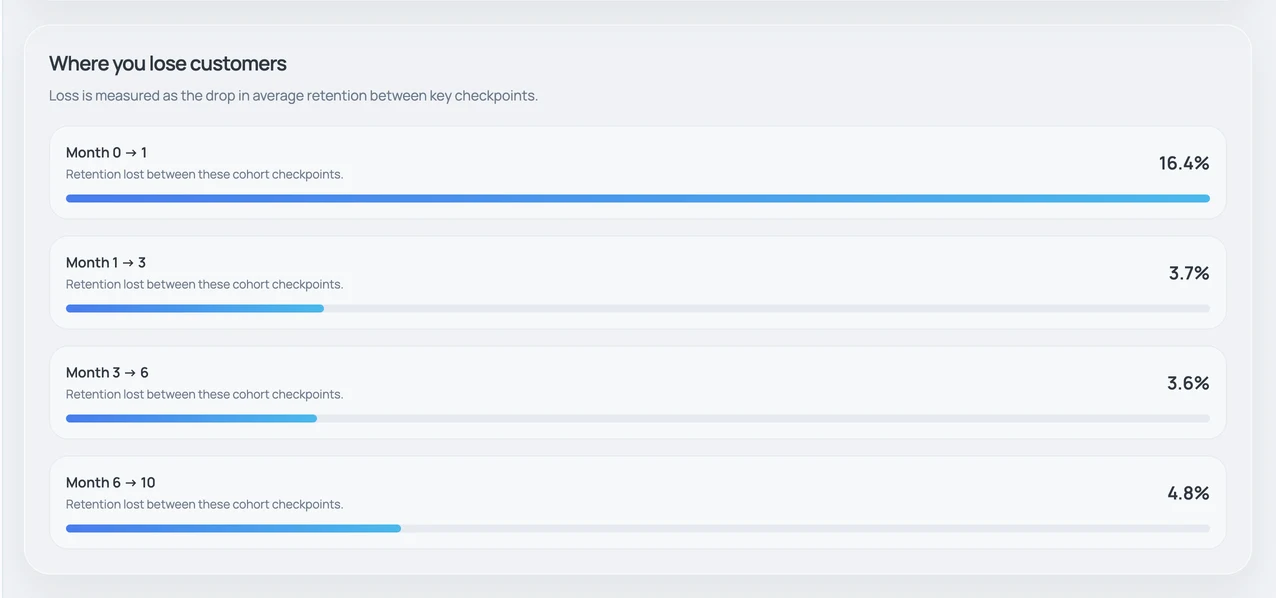
Growth
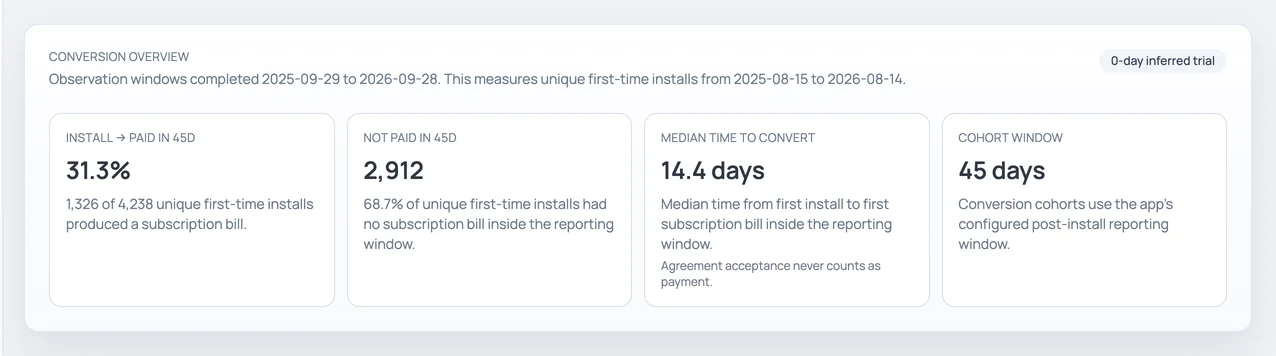
Measure install-to-paid conversion
- Conversion read next to install and uninstall movement
- Ranges that line up with releases and pricing changes
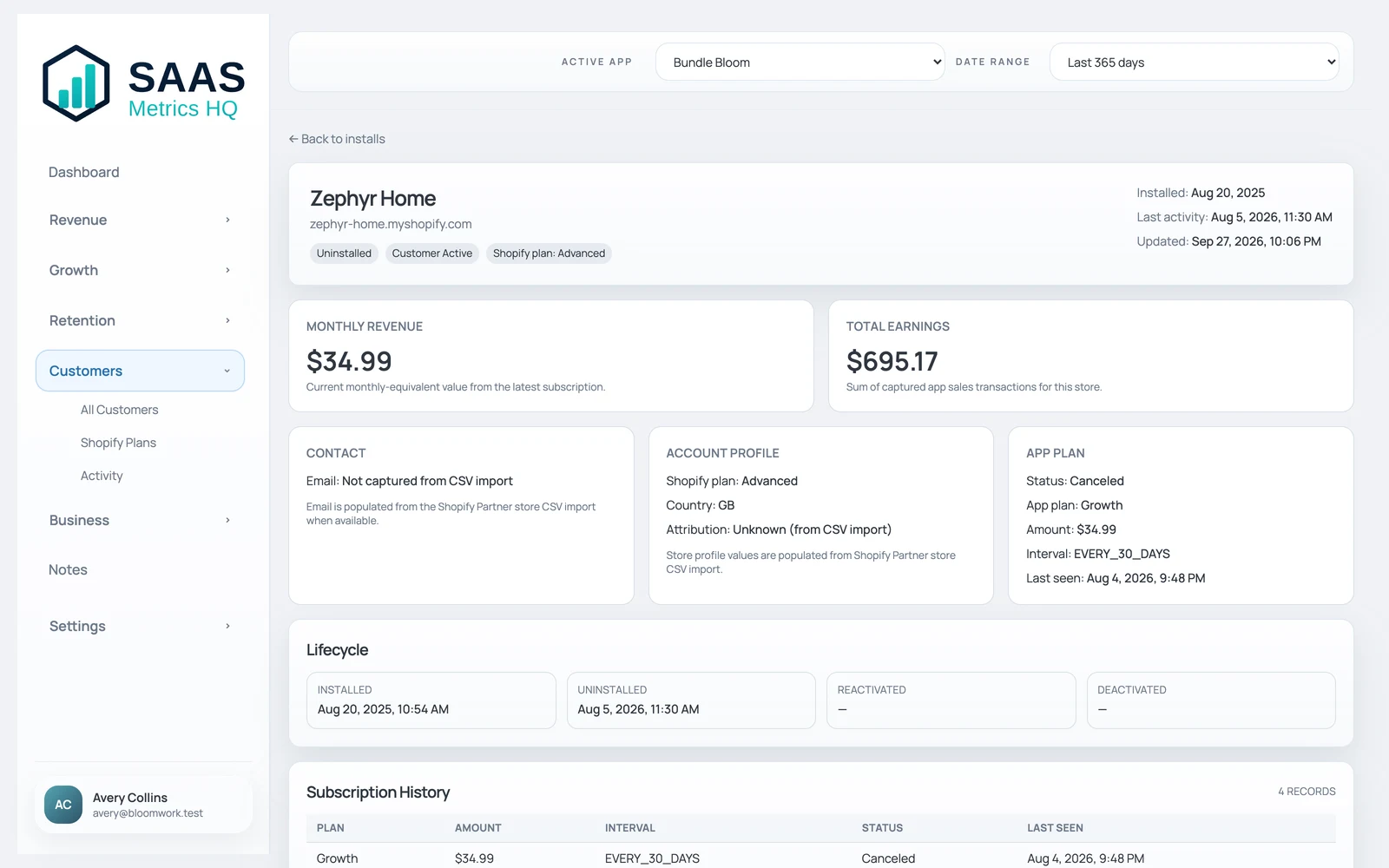
Customers
Investigate one store in a couple of clicks
- Search customers and open customer detail
- Compare Shopify plans and review customer activity
Business reports
Payouts and fees beside the operating metrics
- Shopify payouts across your chosen range
- Estimated Shopify fees on revenue
Payout and fee outputs are operational estimates, not bank or accounting records.
View business reports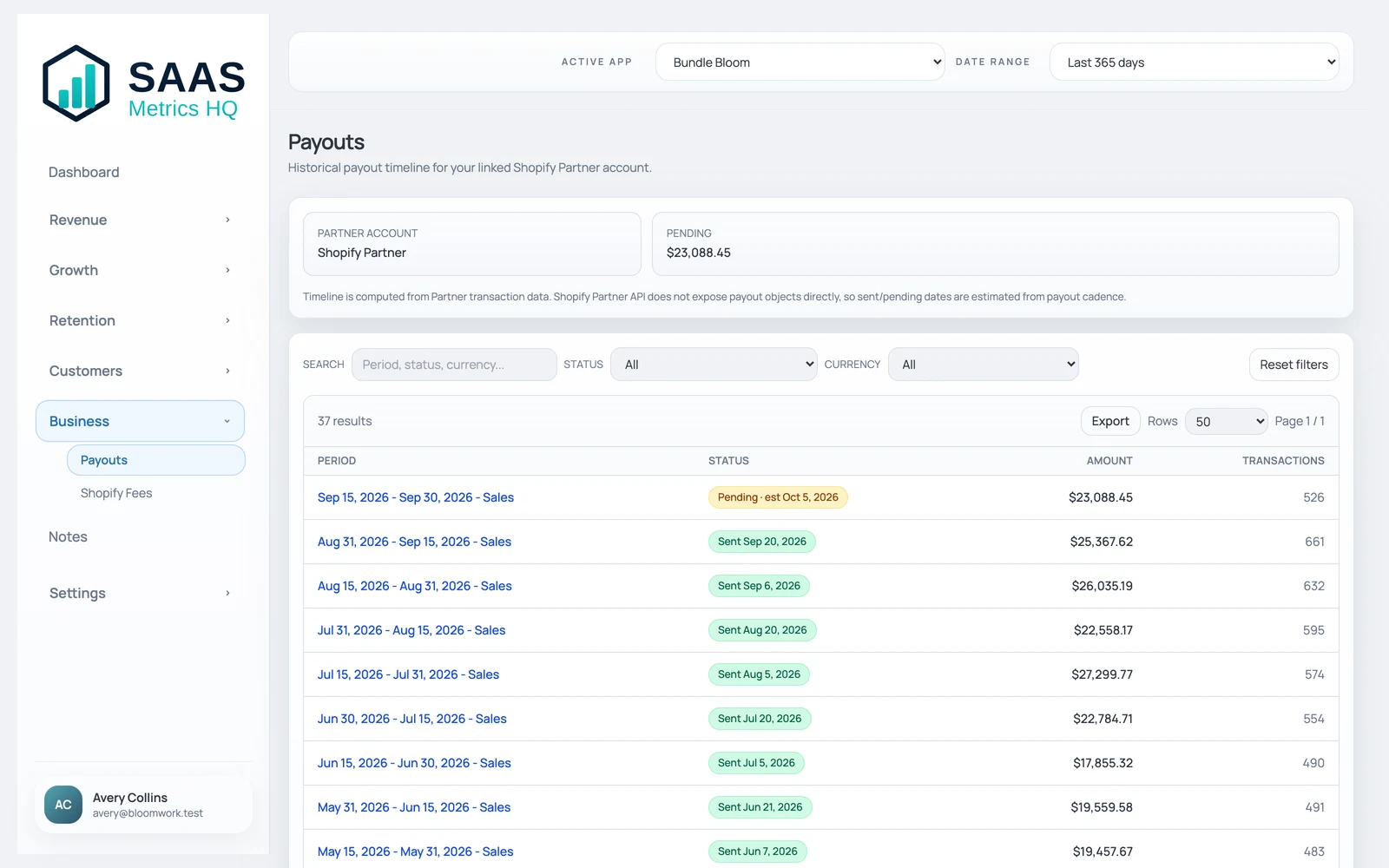
Use cases
Built around the jobs app teams actually have
Founders
Know whether the app is growing and retaining revenue.
Key reports: Dashboard, MRR, conversion and churn
Product growth
See releases and pricing changes beside your results.
Key reports: Notes, retention and customer activity
Operations and support
Investigate customer and store changes quickly.
Key reports: Customer detail, total users and activity
Multi-app portfolios
Switch between apps without spreadsheet sprawl.
Key reports: Active-app control and report consistency
Reliability and clarity
Know what the data is telling you, and what it is not
Every report shows whether data is complete, partial, backfilling, unavailable or in error, with a label rather than colour alone.
- Metric definitions stay visible so numbers can be checked.
- Shopify Partner transaction data supports analytics; it is not an accounting record.
- Shopify Partner credentials are encrypted server-side.
Pricing
Pricing that follows your measured MRR
Plans start at US$0 a month and follow your measured MRR. Every plan includes unlimited apps in one workspace. Pricing applies when SaaSMetricsHQ launches.
Free
US$0
Measured MRR up to US$500
Bring your Shopify app data into one operating view while you are getting started.
- Unlimited apps in one workspace
- Revenue, retention, growth and customer reports
- Data-readiness states on every report
- Notes for launches, pricing changes and incidents
Starter
Most commonUS$9/ month
Measured MRR US$500.01 to US$5,000
For growing Shopify apps that need consistent reporting every week.
- Everything in Free
- Unlimited apps in one workspace
- Daily, weekly or monthly digests
- Payouts and estimated Shopify fees
Includes one seven-day workspace trial where eligible.
Join the waitlistPro
US$19/ month
Measured MRR above US$5,000
For established app businesses and multi-app portfolios.
- Everything in Starter
- Unlimited apps in one workspace
- Customer detail, Shopify plans and activity
- Supported customer and report exports
Includes one seven-day workspace trial where eligible.
Join the waitlistQuestions about SaaSMetricsHQ
What is SaaSMetricsHQ?
SaaSMetricsHQ is analytics for Shopify app businesses. It turns your Shopify Partner data into MRR, churn, retention, install-to-paid conversion and payout reports for every app you run, in one workspace.
Who is SaaSMetricsHQ for?
Founders and teams that build and sell apps on the Shopify App Store. It does not measure merchant stores, and it does not connect to Stripe or other app marketplaces.
What data does SaaSMetricsHQ use?
Data from your Shopify Partner organisation: installs, uninstalls, subscriptions, charges and payouts. Your history imports in the background after you connect, and you can add plan names and trial settings from supported Shopify exports.
Is the data real-time?
No. Data is refreshed in the background, and every report shows whether its data is complete, partial, backfilling, unavailable or in error.